

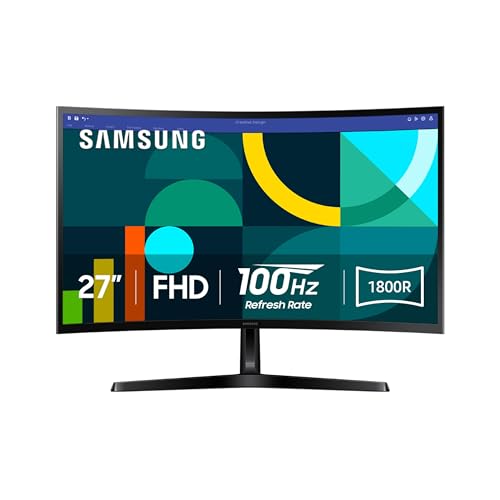
27" Essential S3 (S36GD) Series FHD 1800R Curved Computer Monitor
Immersive 1800R curve meets 100Hz fluidity for an affordable home office upgrade
$120
Affiliate link. Ravvy may earn a commission from qualifying purchases at no extra cost to you.
Ravvy verdict
85.1 / 100
The Samsung S3 is an excellent value for budget-conscious buyers who want the comfort of a curved screen and smooth 100Hz performance, provided they are content with 1080p density.
- Best for
- home office users and students seeking an immersive everyday display
- Buy it if
- You want immersive 1800R curvature reduces eye strain.
- Skip it if
- You are professional graphic designers or competitive 4K gamers.
- Best alternative
- SANSUI Monitor 24 Inch 100Hz PC Computer Monitor, FHD for Home Office (budget-conscious remote workers and students building a dual-monitor setup)
How it scores on what matters
- Eye Comfort92.0
- Visual Immersion88.5
- Motion Clarity82.0
- Build Quality78.5
- Text Sharpness74.0
Ravvy factor scores, 0 to 100, derived from specs, owner reviews and category norms.
What it is
The Samsung Essential S3 S36GD is a budget-friendly 27-inch monitor that prioritizes visual comfort and peripheral immersion. By utilizing an 1800R curvature, the screen aligns more naturally with the human field of vision compared to flat panels, which helps reduce eye fatigue during long spreadsheets or study sessions. While the 1080p resolution is standard for this size, the high 3,000 to 1 contrast ratio ensures deep blacks and vibrant colors that typical office monitors often lack. Performance is surprisingly smooth for an entry-level display thanks to the 100Hz refresh rate. This provides a noticeable step up from the standard 60Hz or 75Hz found in most productivity monitors, resulting in fluid mouse movements and less motion blur during casual gaming. While it lacks professional-grade color accuracy, its eye-care features and slim profile make it a practical and attractive centerpiece for a modern home workspace or a secondary gaming setup.
Ravvy AI insight
At 27 inches, 1080p resolution is at its limit for sharpness, but the 100Hz refresh rate and VA panel contrast make this feel more premium than its price suggests. It is a strategic buy for users who prioritize eye comfort over pixel density, especially given the TÜV-certified flicker-free technology.
Generated from owner feedback, product specs, pricing, and retailer data. Last updated Aug 18, 2026.
What owners praise
- Immersive 1800R curvature reduces eye strain
- Fluid 100Hz refresh rate outperforms standard office monitors
- High 3,000:1 contrast ratio for deep blacks
- Slim and modern aesthetic fits any desk
- Certified blue light reduction for late-night use
- Excellent value-to-performance ratio
What to know first
- 1080p resolution can look slightly soft on a 27-inch panel
- Single HDMI port limits multi-device connectivity
- Peak brightness of 250 nits may struggle in very sunny rooms
Specifications
- UPC
- 887276844237
- GTIN
- 887276844237
- Brand
- Samsung
- Color
- Black
- Shape
- Curved
- Voltage
- 110 volts
- Brightness
- 250 cd/m²
- Model Name
- S36GD
- Resolution
- FHD 1080p
- Unit Count
- 1 Count
- Color Gamut
- 0.95
- Item Weight
- 8.4 pounds
- Screen Size
- 27 inches
- Aspect Ratio
- 16:9
- Display Type
- LED
- Manufacturer
- Samsung
- Model Number
- LS27D366GANXZA
- Refresh Rate
- 100 hertz
- Adaptive Sync
- G-Sync Compatible
- Mounting Type
- Wall Mount
- Response Time
- 4 milliseconds
- Screen Finish
- Curved
- Series Number
- 3
- Viewing Angle
- 178 degrees
- Warranty Type
- 1 Year Manufacturer Warranty
- Contrast Ratio
- 3,000:1
- Native Resolution
- 1920x1080
- Power Consumption
- 35 watts
- Compatible Devices
- Desktop, Gaming Console, Laptop
- Display Technology
- LED
- Additional Features
- Blue Light Filter, Curved, Flicker-Free, Ultra-Slim
- Included Components
- HDMI Cable, Power Cable
- Warranty Description
- 1 Year Manufacturer
- Hardware Connectivity
- D-Sub, HDMI
- Connectivity Technology
- D-Sub, HDMI
- Item Dimensions D x W x H
- 9.2"D x 24.5"W x 18.4"H
- Specific Uses For Product
- Business, Gaming, Multimedia
- Display Resolution Maximum
- 1920 x 1080 pixels
- Screen Surface Description
- Curved
- Total Number of HDMI Ports
- 1
- Number of Component Outputs
- 2
- Picture Quality Enhancement Technology
- Blue Light Filter, Flicker-Free
How to get the most out of it
Enable 100Hz Refresh Rate
Windows often defaults to 60Hz. Go to your Display Settings, select Advanced Display, and manually toggle the refresh rate to 100Hz to experience the full smoothness of this panel.
Ownership tips
tip
Optimize Viewing Distance
To get the most out of the 1800R curve, sit approximately 2 to 3 feet away from the screen. This ensures the edges of the monitor are within your peripheral vision without causing neck strain.
care
Cleaning the Curved Surface
Use a dry microfiber cloth to remove dust. If a deeper clean is needed, apply a small amount of distilled water to the cloth rather than spraying the monitor directly to prevent moisture from seeping into the bezel.
Frequently asked questions
Does this monitor have built-in speakers?
No, the Samsung S36GD does not include integrated speakers. You will need to use external computer speakers, headphones, or the audio output on your connected PC or laptop.
Is 1080p enough for a 27-inch screen?
While 1440p is sharper, 1080p is perfectly functional for general office work, web browsing, and gaming. It is particularly helpful for users who prefer larger text and UI elements without scaling.
Can I mount this monitor on a monitor arm?
Yes, this monitor is VESA mount compatible. This allows you to remove the included stand and attach it to a wall mount or articulating desk arm for better ergonomics.
What is the benefit of a 100Hz refresh rate over 60Hz?
The 100Hz rate updates the image 100 times per second, making fast-moving content appear much smoother. You will notice less ghosting during gaming and a more responsive feel when moving your mouse or scrolling through documents.
Where can you buy the 27" Essential S3 (S36GD) Series FHD 1800R Curved Computer Monitor?
27" Essential S3 (S36GD) Series FHD 1800R Curved Computer Monitor is sold through Amazon, and Samsung also lists it through its own site and major retail partners. The buy link on this page goes straight to the current Amazon listing, which is where stock and pricing update most often.
How much does the 27" Essential S3 (S36GD) Series FHD 1800R Curved Computer Monitor cost?
The last price Ravvy recorded was $120. Retail pricing on monitors moves with promotions and stock, so treat that figure as a reference point and check the live listing before you buy.
How do you get the 27" Essential S3 (S36GD) Series FHD 1800R Curved Computer Monitor for a cheaper price?
Three tactics work best: watch for holiday and seasonal sale events when monitors discounts run deepest, compare the open box or renewed listing against new stock, and check whether Samsung is running a coupon or bundle. Adding the product to your Ravvy wishlist keeps it handy so you can revisit the listing when prices drop.
Is the 27" Essential S3 (S36GD) Series FHD 1800R Curved Computer Monitor in stock right now?
It was in stock at our last check. Availability on popular monitors can change within hours, so the live listing is the source of truth.
Is the 27" Essential S3 (S36GD) Series FHD 1800R Curved Computer Monitor worth it?
Ravvy scores it 85.1 out of 100. The strongest argument for it is immersive 1800R curvature reduces eye strain. The trade off to weigh is 1080p resolution can look slightly soft on a 27-inch panel.
Who should buy the 27" Essential S3 (S36GD) Series FHD 1800R Curved Computer Monitor?
It fits home office users and students seeking an immersive everyday display If that does not describe your situation, compare it with the other options in Monitors before committing.
What are the key specs of the 27" Essential S3 (S36GD) Series FHD 1800R Curved Computer Monitor?
UPC: 887276844237. ASIN: B0DB9Q5G3R. GTIN: 887276844237. Brand: Samsung.
What are good alternatives to the 27" Essential S3 (S36GD) Series FHD 1800R Curved Computer Monitor?
Compare it against the other scored picks in Monitors on Ravvy. We rank every option in that group by the same criteria, so you can see which model wins on value, quality, and owner sentiment before you decide.
Get scored
Have a product we should score?
Send us a link and we will run it through the Ravvy Score model, then show you how it compares to similar products.
Submit a productAlternatives worth comparing

Samsung
32" Flat Computer Monitor
Best for budget conscious professionals and students needing a large secondary screen
- 75Hz Refresh Rate
- AMD FreeSync Support
- Three-Sided Borderless Frame

Best for budget-conscious students and remote workers who enjoy casual gaming
- 120Hz Refresh Rate
- IPS Wide Viewing Angle
- Slim Bezel Design

Best for budget-conscious remote workers and students building a dual-monitor setup
- 100Hz Refresh Rate
- VA Panel with HDR10
- Ultra-Thin Bezel Design