
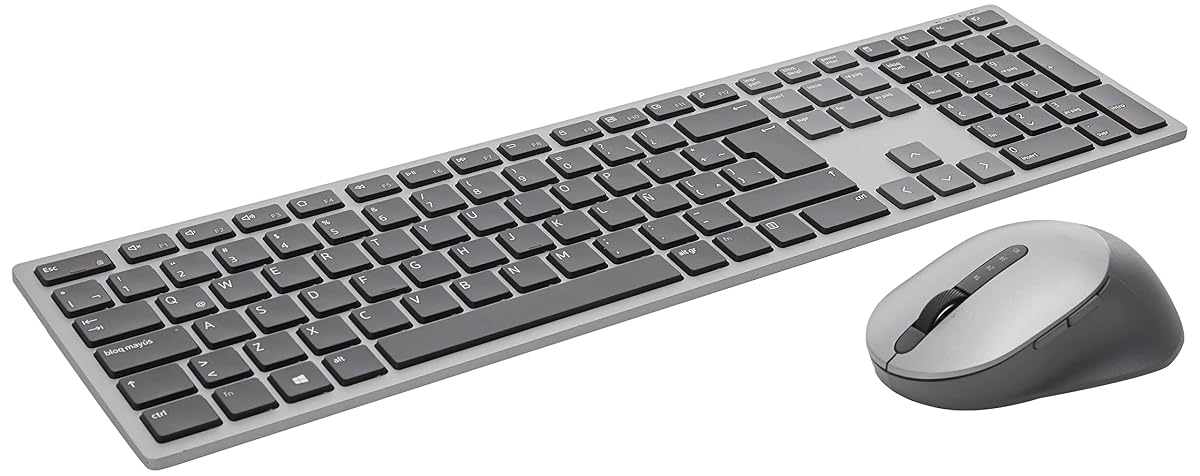
Premier Multi-Device Wireless Keyboard and Mouse KM7321W
Premium Multi-Device Control for Power Users and Clean Desks
$114
Affiliate link. Ravvy may earn a commission from qualifying purchases at no extra cost to you.
Ravvy verdict
89.2 / 100
The Dell Premier KM7321W is the ideal choice for office power users who need to control three devices from one sleek interface, trading mechanical feedback for supreme quietness and aesthetic polish.
- Best for
- multi-device professionals and remote workers with minimalist setups
- Buy it if
- You want seamless switching between three connected devices.
- Skip it if
- You prefer mechanical key switches.
- Best alternative
- Logitech MX Keys S Combo Performance Wireless Keyboard and Mouse - Graphite (creative professionals and software engineers who multitask across multiple computers)
How it scores on what matters
- Battery Life98.0
- Connectivity95.0
- Build Quality91.0
- Customization89.0
- Ergonomics82.0
Ravvy factor scores, 0 to 100, derived from specs, owner reviews and category norms.
What it is
The Dell Premier KM7321W is a sophisticated input duo designed for professionals who juggle multiple systems simultaneously. Draped in a refined Titanium Grey finish, this full-sized keyboard and mouse set utilizes both 2.4GHz wireless and Bluetooth 5.0 to pair with up to three devices. Switching between a laptop, desktop, and tablet is effortless thanks to dedicated connection buttons, making it a centerpiece for efficient multi-tasking without the clutter of extra peripherals. The typing experience is focused on silence and tactile precision, appealing to those in shared office environments. Customization is at the heart of this kit, featuring twelve programmable keys on the keyboard and a high-precision mouse with five programmable buttons. Users can map these to their most frequent shortcuts using Dell Peripheral Manager, significantly speeding up complex workflows. The hardware is surprisingly robust despite its slim profile, offering a premium feel that matches modern high-end monitors and laptops. With an advertised battery life that stretches into years rather than months, it is a set-and-forget solution for busy professionals who value reliability over flashy lighting or gaming features.
Ravvy AI insight
When comparing this to standard office bundles, the value lies in the 12 programmable keys and the triple-connectivity feature. Buyers should ensure they download the Dell Peripheral Manager software to unlock the full potential of the shortcuts, as the default settings only scratch the surface of its utility. The 1600 DPI mouse is excellent for productivity but may feel slow for ultra-high-resolution gaming setups.
Generated from owner feedback, product specs, pricing, and retailer data. Last updated Aug 24, 2026.
What owners praise
- Seamless switching between three connected devices
- Exceptional 36-month battery life rating
- Twelve programmable keys for workflow customization
- Whisper-quiet typing experience suitable for offices
- High-quality Titanium Grey aesthetic matches premium laptops
- Included batteries for immediate setup
What to know first
- Membrane keys lack the satisfying click of mechanical boards
- Software customization is primarily limited to Windows
- Mouse DPI might feel low for specialized design work
Specifications
- UPC
- 884116381952
- GTIN
- 884116381952
- Brand
- Dell
- Color
- Grey (Titanium Grey)
- Unit Count
- 1 Count
- Item Weight
- 645 g
- Manufacturer
- DELL
- Model Number
- 580-AJIY
- Power Source
- Battery Powered
- Built-In Media
- Mouse Keyboard
- Item Type Name
- monitor
- Number of Keys
- 12
- Keyboard Layout
- QWERTY
- Mfr Part Number
- 580-AJIY
- Number of Packs
- 1
- Special Feature
- Programmable Keys
- Operating System
- Windows, macOS
- Compatible Devices
- Laptop, Personal Computer, Tablet
- Number of Batteries
- 3 AA batteries required. (included)
- Connectivity Technology
- 2.4 GHz, Bluetooth 5.0
- Compatible Operating System Family
- Windows
- Global Trade Identification Number
- 00884116381952
- Other Special Features of the Product
- Programmable Keys
- Minimum Required Operating System Version
- Windows 11
How to get the most out of it
Switching Between Devices
Use the dedicated connection buttons on the top right of the keyboard and the mouse to toggle between your paired Bluetooth devices and the 2.4GHz USB receiver. The status lights will indicate which device is currently active.
Ownership tips
tip
Maximize Customization
Install the Dell Peripheral Manager software immediately. This allows you to remap the 12 function keys to specific applications like Zoom, Excel, or Photoshop to save time on repetitive tasks.
care
Maintaining the Finish
Clean the Titanium Grey surface with a slightly damp microfiber cloth. Avoid using harsh chemical cleaners which can degrade the premium coating over time.
Frequently asked questions
Can I use this keyboard with a Mac?
Yes, the KM7321W is compatible with macOS via Bluetooth. However, the Dell Peripheral Manager software used for key programming is primarily designed for Windows, so some advanced customization may be limited on Mac.
How long does the battery really last?
Dell rates the battery life at up to 36 months based on typical office usage. Actual longevity depends on your daily hours of use and the quality of the AA batteries used, but it is one of the longest-lasting sets on the market.
Does it come with a USB receiver?
Yes, it includes a 2.4GHz USB wireless receiver that can be stored inside the mouse. This is useful for devices that do not have built-in Bluetooth capabilities.
Is the keyboard backlit?
No, this model does not feature backlighting. This design choice was made to significantly extend the battery life to three years and maintain a slim, professional profile.
Where can you buy the Premier Multi-Device Wireless Keyboard and Mouse KM7321W?
Premier Multi-Device Wireless Keyboard and Mouse KM7321W is sold through Amazon, and Dell also lists it through its own site and major retail partners. The buy link on this page goes straight to the current Amazon listing, which is where stock and pricing update most often.
How much does the Premier Multi-Device Wireless Keyboard and Mouse KM7321W cost?
The last price Ravvy recorded was $114. Retail pricing on keyboards & mice moves with promotions and stock, so treat that figure as a reference point and check the live listing before you buy.
How do you get the Premier Multi-Device Wireless Keyboard and Mouse KM7321W for a cheaper price?
Three tactics work best: watch for holiday and seasonal sale events when keyboards & mice discounts run deepest, compare the open box or renewed listing against new stock, and check whether Dell is running a coupon or bundle. Adding the product to your Ravvy wishlist keeps it handy so you can revisit the listing when prices drop.
Is the Premier Multi-Device Wireless Keyboard and Mouse KM7321W in stock right now?
It was in stock at our last check. Availability on popular keyboards & mice can change within hours, so the live listing is the source of truth.
Is the Premier Multi-Device Wireless Keyboard and Mouse KM7321W worth it?
Ravvy scores it 89.2 out of 100. The strongest argument for it is seamless switching between three connected devices. The trade off to weigh is membrane keys lack the satisfying click of mechanical boards.
Who should buy the Premier Multi-Device Wireless Keyboard and Mouse KM7321W?
It fits multi-device professionals and remote workers with minimalist setups If that does not describe your situation, compare it with the other options in Keyboards & Mice before committing.
What are the key specs of the Premier Multi-Device Wireless Keyboard and Mouse KM7321W?
UPC: 884116381952. ASIN: B09FKW436P. GTIN: 884116381952. Brand: Dell.
What are good alternatives to the Premier Multi-Device Wireless Keyboard and Mouse KM7321W?
Compare it against the other scored picks in Keyboards & Mice on Ravvy. We rank every option in that group by the same criteria, so you can see which model wins on value, quality, and owner sentiment before you decide.
Get scored
Have a product we should score?
Send us a link and we will run it through the Ravvy Score model, then show you how it compares to similar products.
Submit a productAlternatives worth comparing

Best for multi-tasking professionals who switch between three devices daily
- Customizable SmartKeys for workflow automation
- Precision and high-speed scrolling modes
- Built-in storage for the USB receiver

Best for creative professionals and software engineers who multitask across multiple computers
- Dual Connectivity: Bluetooth LE and Logi Bolt
- 8000 DPI Darkfield sensor
- Smart Action automation macros

Best for professional mac users and creative specialists with multi-device setups
- MagSpeed Electromagnetic scrolling
- 8K DPI any-surface tracking
- Dedicated Mac key layout